Brand Assets for Service Businesses: What You Need and Why
As a seasoned design firm specializing in professional service businesses, I know every interaction—online or offline—reflects my clients' operational capabilities and competence. Unlike product-based businesses, where customers can physically engage with a product before buying, my service-oriented clients must build trust, demonstrate expertise, and establish a strong reputation. This is precisely where brand assets become essential.
Brand assets provide a cohesive framework for the business to showcase itself consistently across various mediums such as proposals, presentations, documents, the website, and client communications. When these assets are developed as a unified system, the brand embodies the same discipline and competence that the firm applies to its work, reinforcing its credibility and professionalism.
So, What Are Brand Assets?
Brand assets are the visual and textual elements a company uses to establish its identity. Given the intangible nature of services, these assets provide tangible "visual proof" of a company's authority and professionalism.
Key brand assets include logos, customized color palettes, corporate typography, pitch decks, proposal templates, and clear brand guidelines. Together, they ensure that a company’s digital presence accurately reflects its reputation and expertise in the real world.
Here is a complete checklist of the visual pieces you need:
When I build out a brand system for a service business, these are the foundational assets I look for.
1. Primary Visual Foundations
Primary Logo: High-resolution source files built for websites, documents, presentations, and other primary brand applications.
Logo Lockups: Distinct layout variations designed for favicons, profile images, presentation covers, signage, and other space-specific uses.
Color Palette: A defined brand color system with exact HEX, RGB, and CMYK codes.
Typography: Specific font families designated for headings, body text, presentations, and supporting business materials.
2. Collateral and Client-Facing Assets
Presentation Decks: Presentation templates designed for sales meetings, client conversations, workshops, and presentations.
Digital Proposals: Branded document frameworks designed for consistent client delivery.
Letterheads: Official document layouts for formal business communication.
Business Cards: Print-ready designs for networking, meetings, and in-person business development.
Invoice Layouts: Branded invoice layouts that remain practical and easy to use.
3. Media and Dynamic Elements
Icon Libraries: Custom digital vectors designed to represent individual services, processes, or recurring ideas.
Photography Guidelines: Photography guidelines covering subject matter, composition, cropping, lighting, and image selection.
Motion Graphics: Custom video intros or motion assets for onboarding, presentations, social media, or other recurring content where they serve a practical purpose.
Three Overlooked Assets You Aren’t Using Yet
The obvious brand assets usually get the most attention: the logo, colors, and website. The gaps tend to show up in the materials a team uses every day, where consistency is harder to maintain without a defined system.
1. Typography for Everyday Business Documents
Many firms have a well-defined type system on the website, then default to Arial, Calibri, or whatever is easiest in presentations, proposals, and documents. That is usually where the visual system starts to split. Defining an approved font system for both branded materials and day-to-day business use gives the team a practical way to stay consistent without making every document feel overdesigned.
2. Internal Document Styles
Case studies, onboarding documents, proposals, reports, and whitepapers all benefit from consistent heading styles, margins, callouts, and supporting graphic elements. Once those decisions are built into the system, the team doesn't start from scratch every time a new document is created. It also keeps client-facing materials from drifting visually as more people begin producing them.
3. A Practical Brand Guide
The brand guide is what ties everything together. It gives the team, contractors, and outside partners a clear reference for logo use, color, typography, imagery, spacing, and other recurring decisions. The goal is not to create more rules. It makes the brand easier to use correctly without having to reinterpret it every time.The Business Impact: Organized vs. Unorganized Assets
The Operational Impact: Organized vs. Unorganized Assets
The difference between an organized brand system and a scattered one usually shows up in small, repetitive problems first. Someone cannot find the correct logo. An older presentation gets reused because it is easier than locating the current file. A proposal goes out with outdated fonts, or a team member rebuilds a layout that already exists somewhere else.
Over time, those small issues create unnecessary work and weaken the consistency of the brand. Employees spend time searching for high-resolution files, updating old decks, correcting mismatched typography, and fixing materials that should already be ready to use. The problem is not usually that the assets do not exist. It is that the system around them is not organized well enough for the team to use confidently.
A centralized digital asset system gives the team one reliable source for the materials they use every day. Current logos, presentation templates, proposal files, photography, and document styles are easier to find, which reduces unnecessary rework and makes it easier for different people to produce materials that still feel like they come from the same business.
That consistency also affects how the firm is perceived. When the website, pitch deck, proposal, and supporting materials all follow the same visual system, the business feels more established, more organized, and better prepared to handle serious client work.
“ We recently partnered with a regional management consulting firm whose marketing team was losing roughly 12 hours a week manually patching mismatched proposal decks. By building out a unified asset library and custom slide system, we shortened their proposal turnaround time by 60% and gave the team a consistent set of materials they could use across sales and client presentations. ”
Case Study: The Magnolia Brand Identity System in Application
The Magnolia system shows how a business can organize its visual identity into a practical system that works across digital and print applications.
The system includes a primary logo, supporting logo variations, a defined color palette, typography standards, and branded graphic elements. Each component is designed to work together while remaining flexible enough for different layouts and applications.
The value of the system is not simply how it looks. It gives the business a reliable set of assets that can be used by employees, designers, developers, and print vendors without having to recreate or reinterpret the brand each time.
When these files are stored in a structured master folder, teams can quickly access the correct asset for websites, proposals, presentations, social media, or print materials.
A complete file library should include scalable source or vector formats such as SVG, EPS, or AI, along with ready-to-use formats such as PNG, JPG, and PDF.
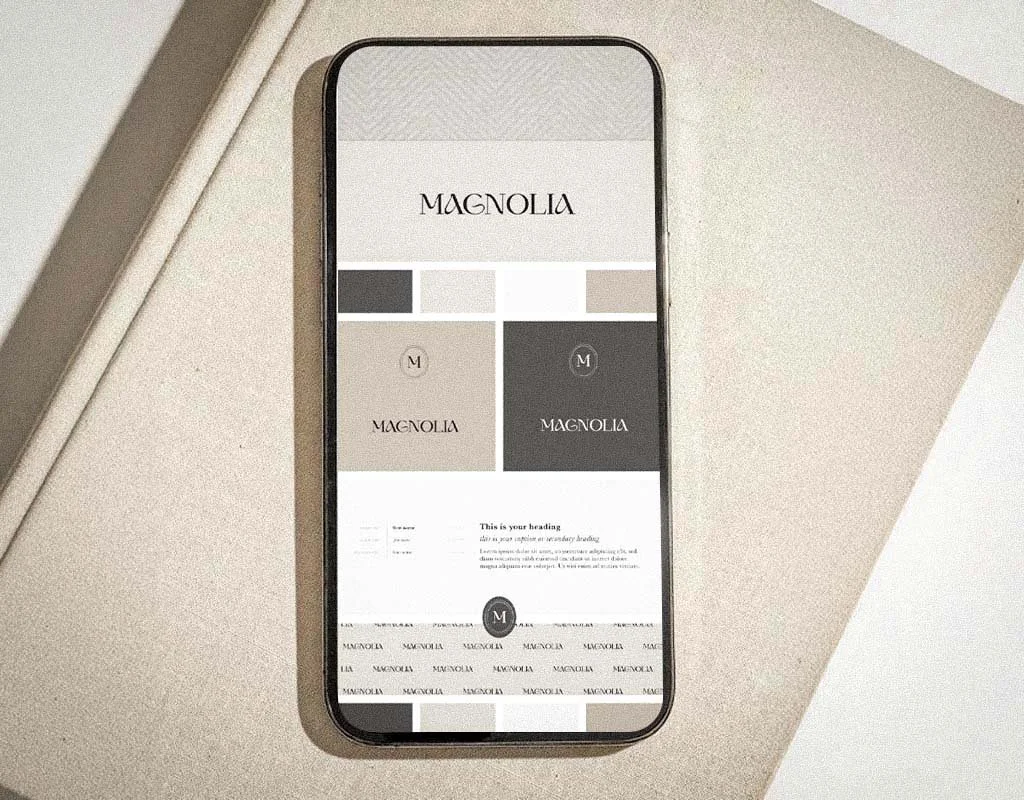
Magnolia Brand Identity Elements
The Magnolia system includes:
Primary Logo: The main logo used across primary brand applications.
Color Palette: A defined set of neutral colors used consistently throughout the brand.
Submarks and Logo Variations: Supporting versions that work across different backgrounds and layout requirements.
Typography Hierarchy: Defined heading and body fonts that establish consistency across digital and printed materials.
Pattern System: Supporting graphic elements that extend the identity beyond the primary logo.
Frequently Asked Questions
1. What brand assets does my service business need?
The right set depends on how the business sells and delivers its work, but most service firms need a primary logo system, color palette, typography rules, supporting graphics, client-facing templates, and practical usage guidelines.
2. Why isn’t a primary logo enough for my practice?
Because the logo has to work across different formats. A website header, social profile, presentation cover, proposal, and printed document do not all use the same proportions or file type.
3. Is my website considered a brand asset?
Yes. Your website is one of your primary digital brand assets because it combines your visual identity, services, messaging, and supporting content in one place.
4. What is included in a complete brand identity system?
A complete brand identity system may include logo variations, a brand mark, color palette, typography, supporting visual elements, messaging direction, file formats for digital and print use, and practical brand guidelines. Business naming may also be included when needed.
5. What are logo variations, and why do they matter?
Logo variations include horizontal, stacked, icon-only, and alternate-color versions. They allow the logo to remain legible and consistent across websites, presentations, proposals, social media, and print materials.
6. Do solo practitioners need a complete brand identity?
A solo practitioner may not need an extensive brand system, but consistent logo files, typography, colors, and basic usage guidelines can prevent inconsistencies as the business grows.
7. Which file types should be included in my brand package?
Include scalable source or vector files such as SVG, EPS, or AI, along with ready-to-use formats such as PNG, JPG, and PDF.
8. How should final brand assets be delivered and organized?
Final assets should be organized in a structured folder system with clearly labeled files and separate folders for web, print, logos, photography, templates, and supporting graphics.
Conclusion: Align Your Identity With Your Business
Your website and proposals should reflect the quality of your current work. When someone recommends your business, prospects will usually look you up before they contact you. If they find outdated services, old projects, or a website that no longer reflects what you do, the brand creates a gap between the reputation you have built and the business they see.
If the business has changed but the brand assets have not, that is usually where I would start.
Need a New Website and Brand System for Your Business?
Boston Graphic Design Studio designs websites and brand identity systems for growing service businesses and established companies. We organize your brand assets, create client-facing templates, and build straightforward websites that give referred prospects the information they need before reaching out.